For College & High School Athletics

One App.
Every
Game Day.

Nivy gives your athletic department its own branded app: tickets and season passes scanned at the gate, concessions, a team store, fundraisers, sponsors and team chat, with every sale in one money report and everything run from one dashboard.

Tickets & Season Passes ✦Offline Gate Scanning ✦One Money Report ✦Your Own Branded App ✦Schedules & Calendars ✦Team Chat & Email ✦Order From Your Seat ✦Team Store ✦Team Fundraising ✦Sponsors ✦Digital Game Programs ✦Fan Rewards ✦Box Scores & MaxPreps ✦Tickets & Season Passes ✦Offline Gate Scanning ✦One Money Report ✦Your Own Branded App ✦Schedules & Calendars ✦Team Chat & Email ✦Order From Your Seat ✦Team Store ✦Team Fundraising ✦Sponsors ✦Digital Game Programs ✦Fan Rewards ✦Box Scores & MaxPreps ✦
The Platform

Everything Game Day Needs. One Platform.

Pick a feature to see how it works.

  1. 01Ticketing & Gate ScanningSell in the app, scan at the gate
  2. 02Money ReportEvery sale in one report for the business office
  3. 03Your Own Fan AppYour name, colors and logo in the app stores
  4. 04Push NotificationsReach every fan’s lock screen
  5. 05Team CommunicationTeam chats and messages, run by coaches
  6. 06ConcessionsFans order from their seat
  7. 07Team StoreSpirit wear in the app and online
  8. 08FundraisingTeam fundraisers fans give to in the app
  9. 09SponsorshipOne list of sponsors, put to work everywhere
  10. 10Sponsor PromosOffers fans unlock on the home screen
  11. 11Game ProgramsDigital programs on every game
  12. 12SchedulingEvery sport’s games in one place
  13. 13Scores & StatsFinals, box scores and MaxPreps export
  14. 14Fan RewardsPoints for showing up, prizes to spend them on
01

Ticketing & Gate Scanning

Sell tickets in the app and on the web, plus season and all-sport passes. Scan them at the gate with Nivy Pro on any phone.

  • General admission or reserved seats, comps and cash at the door
  • Scanning keeps working when the stadium signal drops and catches a ticket that was already used
  • Refunds and a sales report per event; money goes to your own Stripe account
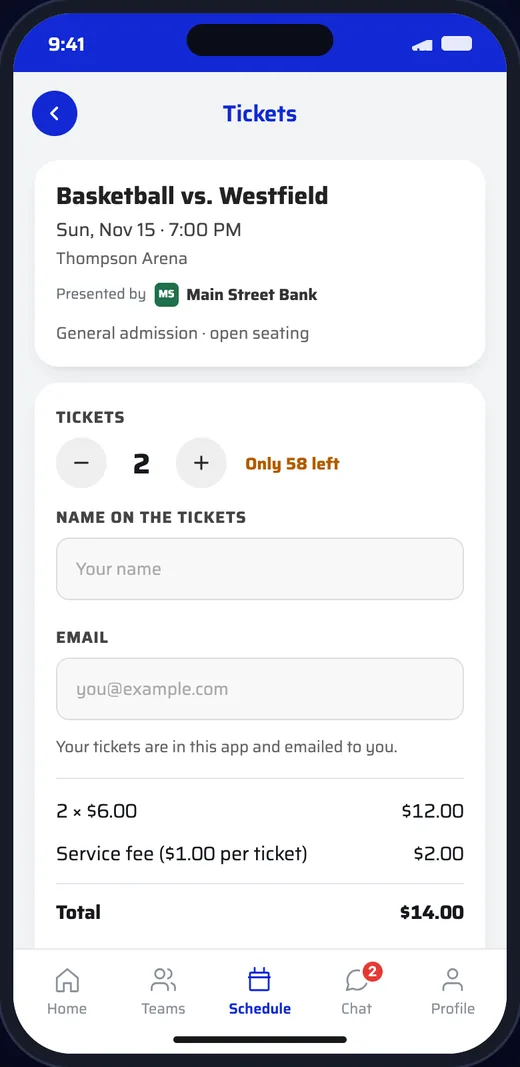
Buying two tickets to a basketball game in the fan app
02

Money Report

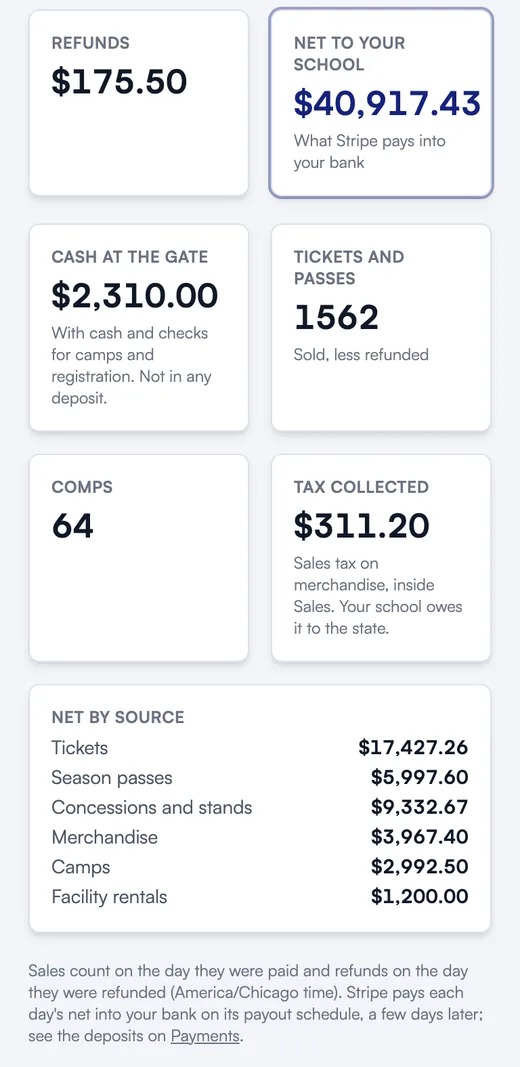
Tickets, passes, concessions, the team store, camps and rentals in one report, with what reached your bank and what came in as cash.

  • Sales, refunds and net for any dates, by day, event, stand or shop
  • Cash at the gate and sales tax on merchandise kept apart
  • Download any view as a spreadsheet
Money report: net to the school, cash at the gate and net by source
03

Your Own Fan App

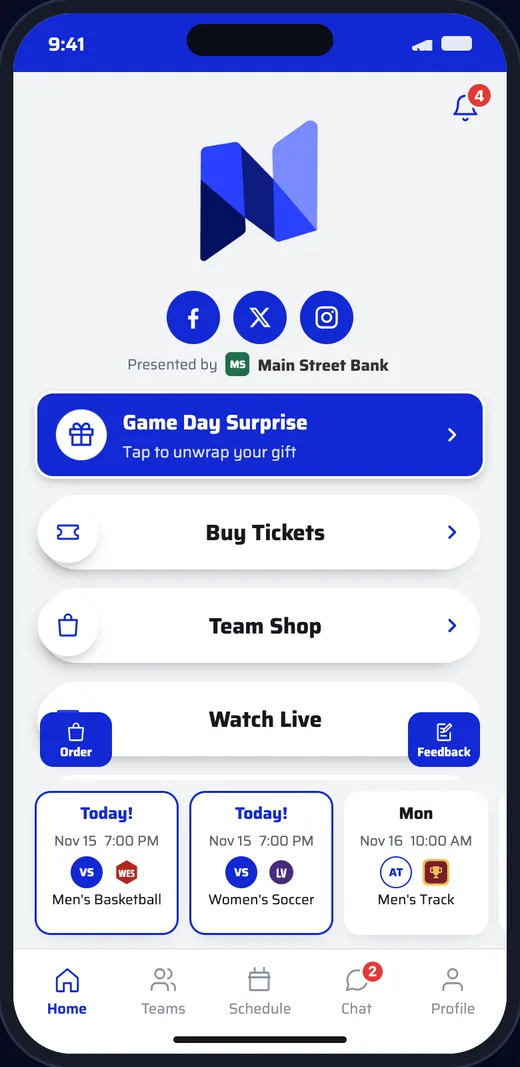
An iOS and Android app published under your school’s name. Schedules, scores, rosters, news, livestream and radio links, all in one place.

  • Choose the home screen buttons from the dashboard: up to 12, each with its own icon and link
  • Your social accounts and your “Presented by” sponsor up top
  • This week’s games pinned to the bottom of the home screen
Fan app home screen with the school logo, sponsor, home buttons and this week’s games
04

Push Notifications

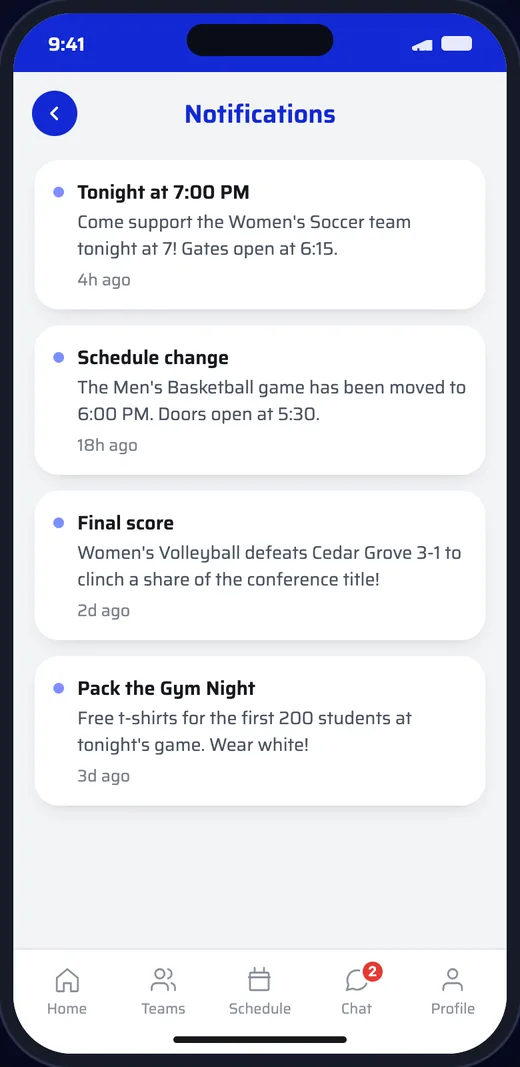
Write a message, pick who gets it and send it now or schedule it. Fans see it on their lock screen and in the app’s notification list.

  • Send to everyone, to fans of one team or to one type of fan
  • Schedule up to 30 days ahead and cancel before it goes out
  • A history of every push and who sent it; coaches send only to their own teams
Fan app notification list with game reminders and a schedule change
05

Team Communication

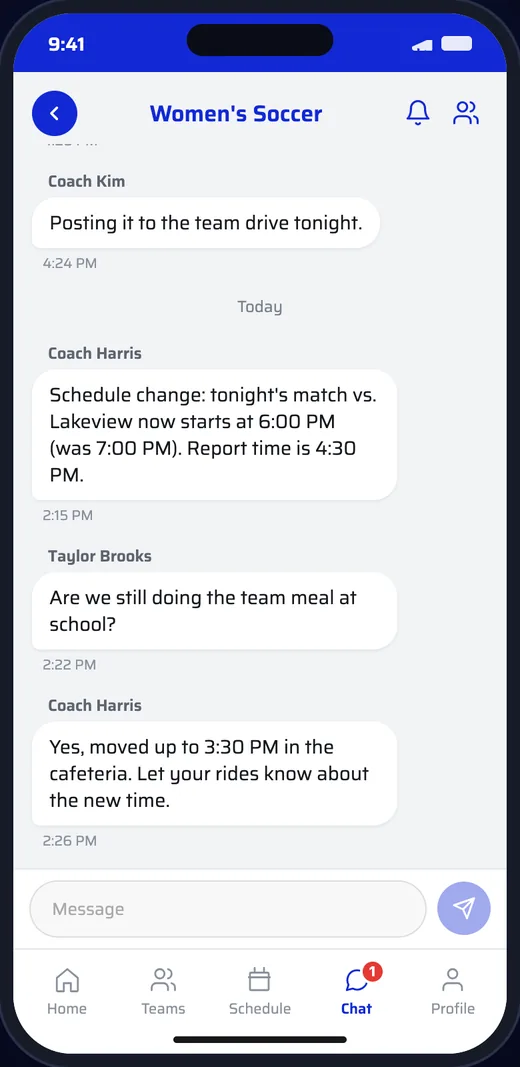
Coach-run team chats for players and parents, plus team messages by email to the whole team or a saved group.

  • A report button on every message, with AD oversight
  • Messages sent now or scheduled
  • Mute a chat, see who’s in it, and get a push for new messages
Women’s soccer team chat with a coach posting a schedule change
06

Concessions

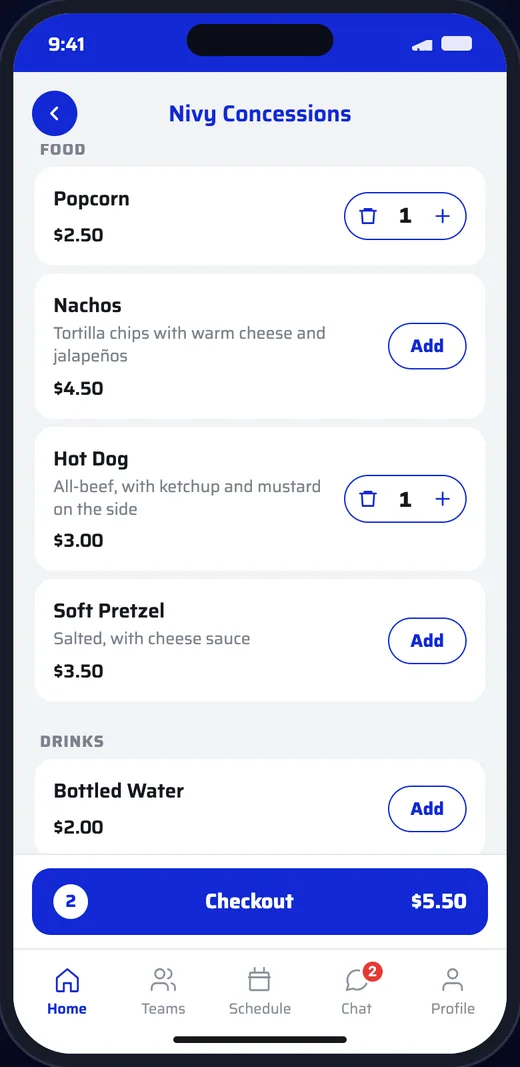
Fans order food, drinks and gear in the app, pay with their phone and get a pickup number. Your stand sees each order come in.

  • Fans watch their order go from received to preparing to ready, then pick up with a number
  • Switch items off when they sell out, or stop taking orders
  • Menus with options and add-ons; money goes to your own Stripe account
Concessions menu in the fan app with popcorn and a hot dog in the cart
07

Team Store

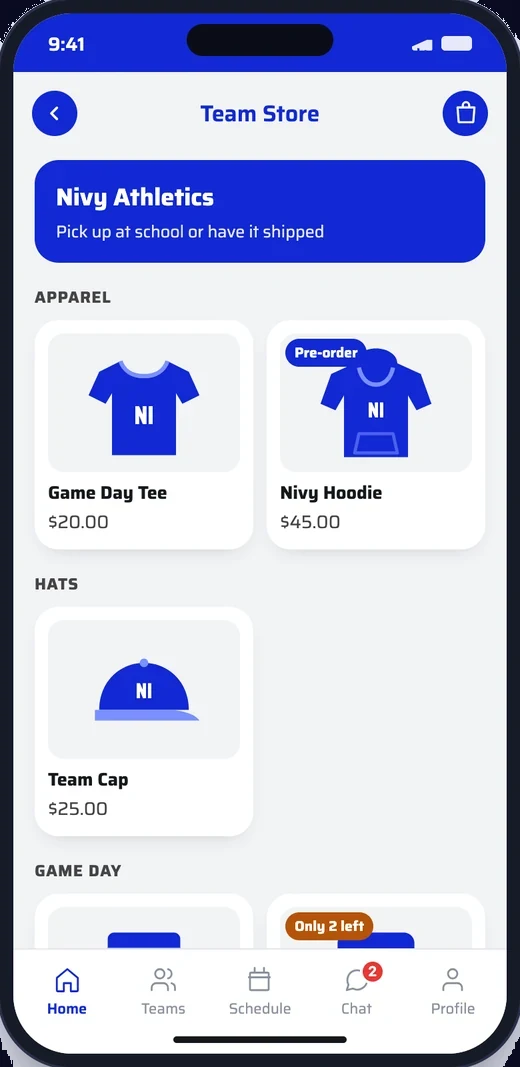
Sell shirts, hoodies and game-day gear with sizes and stock. Fans pick up at school or have it shipped.

  • Stock per size, sold-out sizes greyed out, and pre-orders until a closing date
  • Pickup, shipping or both, with discount codes and sales tax if you charge it
  • The same store on a web page; money goes to your own Stripe account
Team store in the fan app with tees, a pre-order hoodie and a cap
08

Fundraising

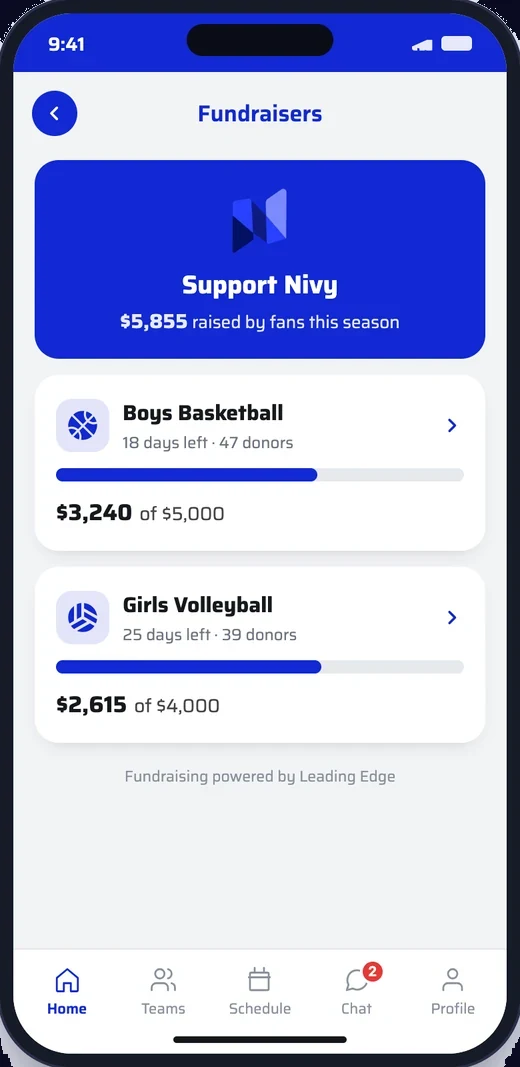
Donation fundraisers for every team, boys’ and girls’, from the Fundraisers card on your home screen. Powered by Leading Edge, which pays your school directly.

  • A goal, a progress bar and recent gifts on every fundraiser
  • Players share their own links with family and friends
  • A push to fans when a team is close to its goal
Fundraisers in the fan app: a boys’ and a girls’ team with their progress
09

Sponsorship

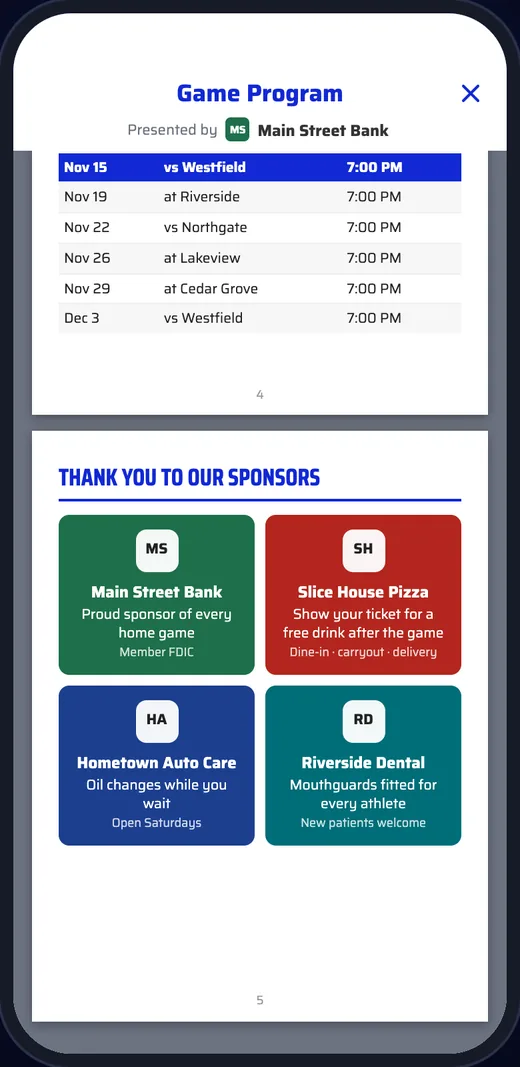
Keep every sponsor in one list, then put them to work across the app.

  • Home screen promos and the “Presented by” spot
  • Sponsor pages in game programs and on tickets
  • The rewards program banner
Sponsor thank-you page in a digital game program
10

Sponsor Promos

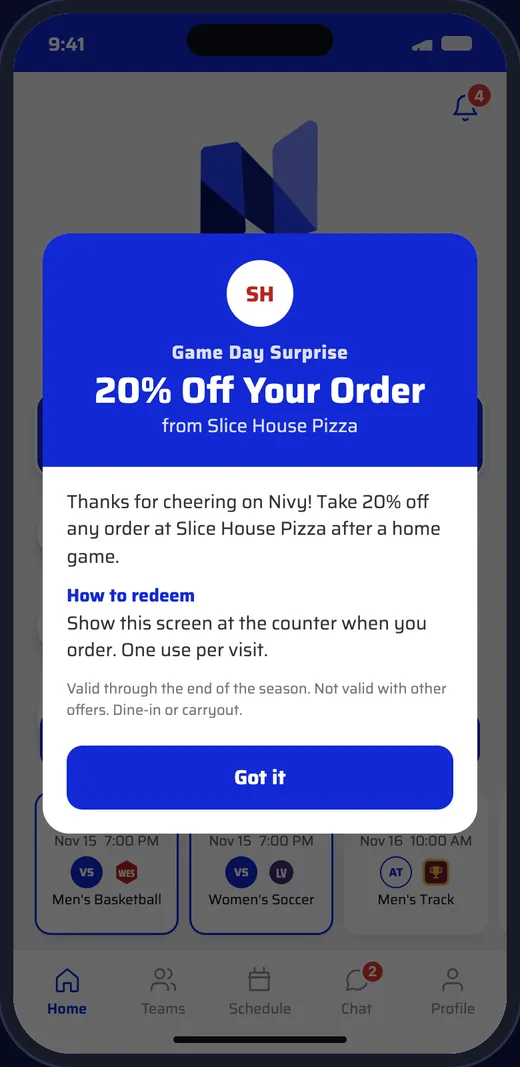
Put a sponsor’s offer on the home screen as a gift fans tap to open. You set the offer, how to redeem it and when it runs.

  • Headline, description, how to redeem, terms and the sponsor’s logo and color
  • Schedule a start and an end; promos switch on and off by themselves
  • A live preview of the banner and the offer as you type
Sponsor promo open in the fan app: 20% off your order from a local pizza shop
11

Game Programs

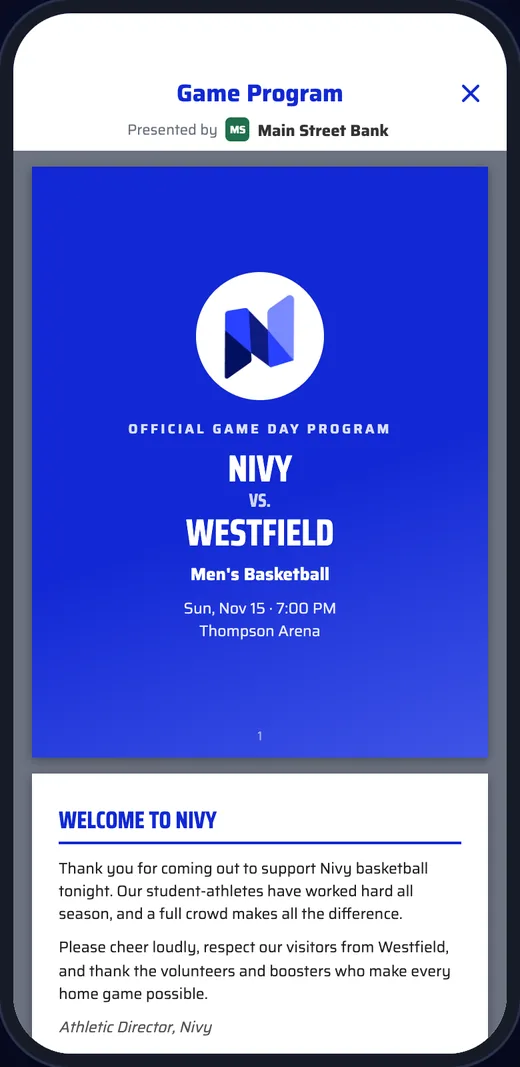
Upload a program to any game on the schedule and fans open it from the game in the app. Update it right up to kickoff, with nothing to print.

  • Your own design: rosters, lineups, a welcome from the AD, sponsor ads
  • Upload a PDF per game from the dashboard or Nivy Pro
  • A “Presented by” sponsor on every program
Digital game program cover for a men’s basketball game
12

Scheduling

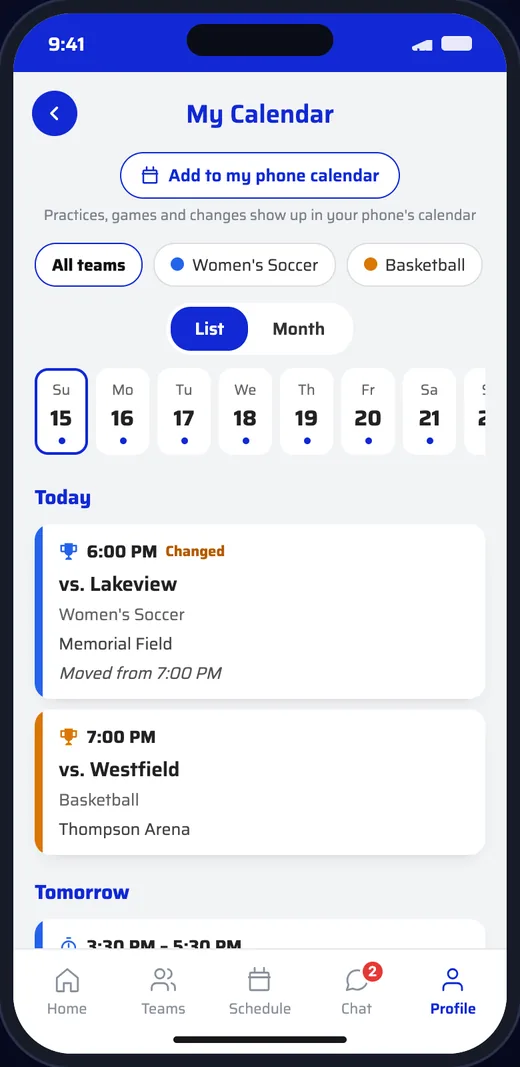
Enter games or import a CSV, by sport and level. Families get one calendar for every team they follow.

  • Postpone, cancel or mark a time TBA; changes show up in the app at once
  • Add practices and team events alongside games
  • Calendar feeds that update on families’ phones
My Calendar in the fan app showing a game moved to 6:00 PM
13

Scores & Stats

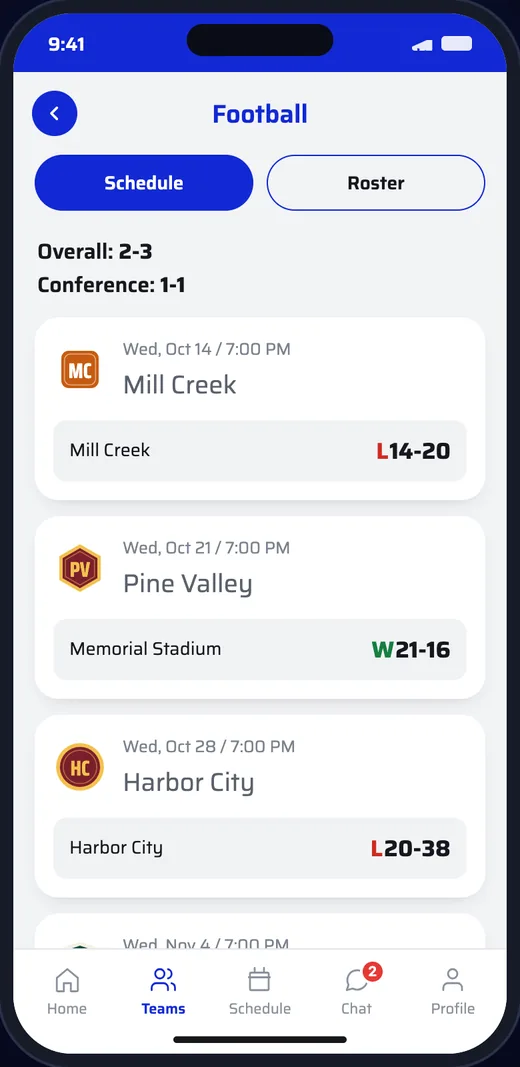
Coaches enter scores and box scores for 11 sports. Fans see finals and season leaders on each team’s page.

  • Enter scores from Nivy Pro right after the game
  • Overall and conference records on each team’s page
  • Stats export straight to MaxPreps
Football team page in the fan app with a 2-3 record and final scores
14

Fan Rewards

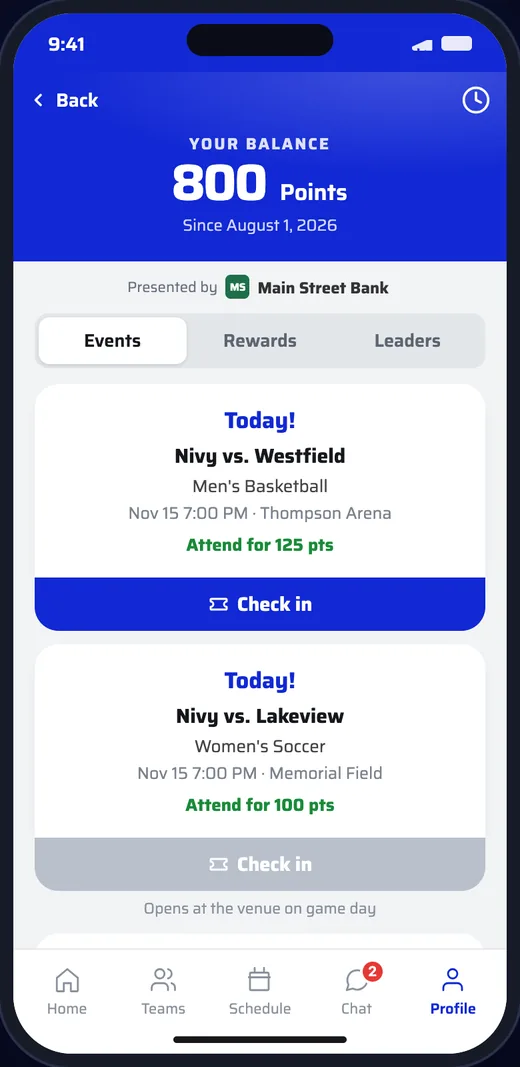
Fans check in at the venue on game day and earn points toward prizes you set. A leaderboard keeps them coming back.

  • Set the signup bonus, points per game and the check-in window
  • Add prizes with a point cost; redeem them for fans from the dashboard
  • Name the program and give it a sponsor banner
Fan rewards screen with an 800 point balance and game day check-in
Who It's For

Built for Everyone on Game Day.

AD
🏫
For Athletic Directors

One dashboard for every sport: schedules, tickets, passes, fundraisers, sponsors, promos and push notifications, with the sales numbers in one place.

PRO
📋
For Coaches & Staff

Nivy Pro puts the dashboard on a phone or tablet. Run the team chat, enter scores, scan at the gate and take cash at the door.

APP
🙌
For Fans & Families

Everything about the teams they follow: games, tickets, order-from-your-seat, game programs, rewards and the team calendar.

Why Nivy

What Sets Us Apart.

The school’s own app

Your brand in the app stores, not a shared app where your school is one of thousands.

Order from your seat

In-app concession ordering with pickup numbers, so the line moves and the stand sells more.

Rewards for showing up

Fans earn points for coming to games and redeem them for prizes.

Moderated team chat

Coaches control the conversation, anyone can report a message and the AD can open any chat.

Works without signal

The gate scanner keeps admitting fans offline and syncs when the connection comes back.

Stats in, MaxPreps out

Enter a box score once. It shows in the app and goes straight to MaxPreps.

How It Works

Your Brand.
Our Platform.

1
We Build Your App

Nivy creates a fully branded iOS and Android app for your athletic department: your colors, your logo, your name in the app stores.

2
Your Staff Run It

The dashboard and the Nivy Pro app let your staff update schedules, sell tickets, message teams and send push notifications. No developers needed.

3
Fans Download & Engage

Fans buy tickets, order food, follow scores and earn rewards. The more you publish, the more they come back, game after game.

4
We Handle Everything Else

Nivy manages hosting, updates, app store compliance and support, so your staff can focus on athletics, not software.

Game Day, From the Fan's Phone
🏈
Kickoff Alert — Tonight 7:00 PM
Gates open at 5:30. Your season pass is in the app: show it at the gate.
Push to all fans · 3 min ago
🌭
Order #214 Is Ready
Pick up your order at the north stand window.
Concessions · 12 min ago
✉️
Bus Leaves at 3:15 Tomorrow
Varsity parents: the bus for Friday’s away game leaves from the field house at 3:15.
Team message to Parents · Scheduled for 8:00 AM
📋
Game Program Now Available
Tonight’s lineups and rosters are live. Presented by your local sponsor.
Push to all fans · 1 hr ago
Get in Touch

Ready to Launch
Your App?

Schedule a DemoEmail Us